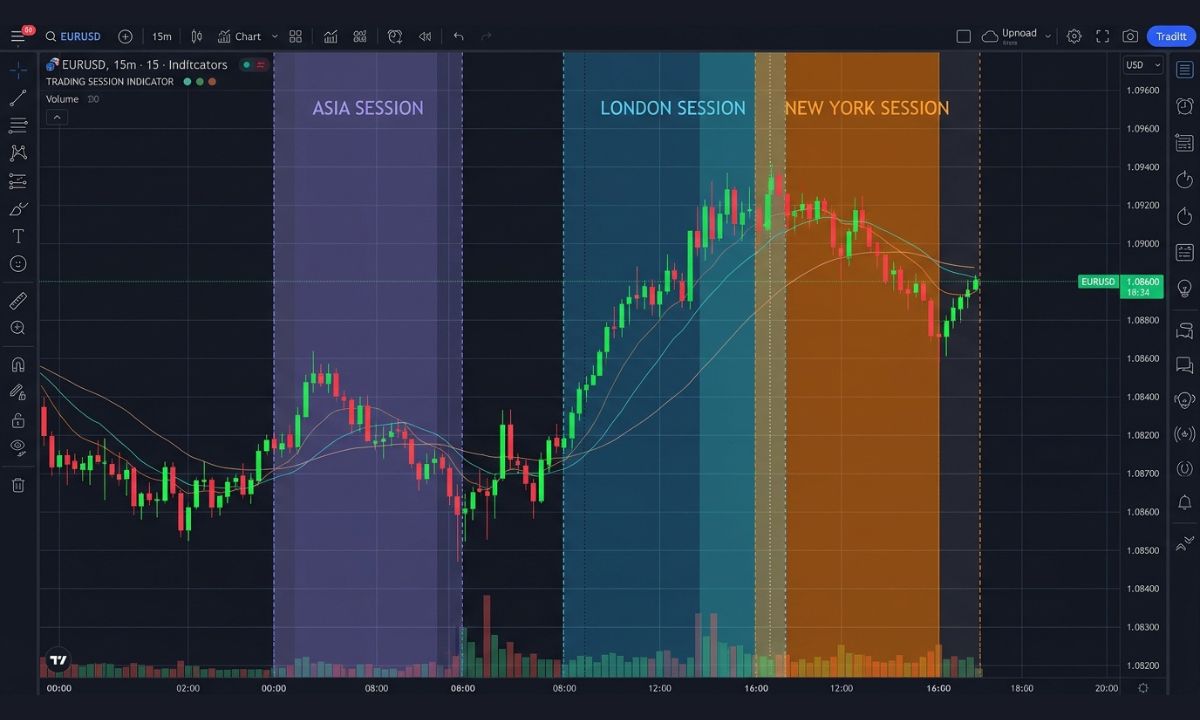
Timing and strategy go hand in hand in forex trading. Currency prices and market liquidity adjust throughout the day depending on which trading sessions are active. This is why many forex traders often rely on the trading session indicator in MT4 to track major forex sessions, such as Tokyo, London, and New York.
For both beginners and experienced traders, understanding these sessions can help improve trade timing, identify periods of high volatility, and avoid trading during slow market conditions. In this guide, you will learn what a trading session indicator is in MT4, how it works, and how to install it.
What Is a Trading Session Indicator in MT4?
A trading session indicator in MT4 is a custom tool that visually displays the major forex market sessions directly on your trading chart. The trading windows typically displayed include Sydney, New York, Tokyo, and London.
The indicators use colored boxes, vertical lines, or background shading to highlight the sessions, making it easier for traders to identify when a particular market opens and closes.
For beginner traders, an MT4 trading times indicator simplifies market timing. Different sessions often produce different trading conditions. For example, the London and New York sessions are known for high volatility and strong price movements. On the other hand, the Asian window often experiences slower market activity.
MT4 trading session indicators are especially useful for day traders and scalpers, who rely on market volatility and liquidity.
How to Install a Trading Session Indicator on MT4
Installing a trading session indicator on MT4 is simple. It makes it easier for you to track major global trading windows, instead of having to set multiple alarms or notifications.
Before we get started, you should have MT4 installed on your device. If you don’t, you can download MT4 via this website link . The next step is to download the MT4 market trading hours indicator file from a trusted source.
Once downloaded, open your MT4 installation directory. Inside it, you will find a folder named MQL4; open it and locate the “indicators” folder. Next, copy and paste the trading session indicator for MT4 file.
Restart your MT4 application, and you should now see the trading session indicator listed in the navigator window. You can start using it by dragging it onto any forex chart. Moreover, you can customize the session colors, time zones, and display options.
How to Read and Use the Indicator Effectively
Installing the trading session indicator on MT4 is one thing, but the most important part is learning how to use it effectively. The first thing to watch is the opening and closing times of each session.
When two sessions overlap, trading volume and volatility typically increase, creating more opportunities for short-term traders. Most traders often time the overlap between the New York and London trading sessions.
Many MT4 indicator trading sessions indicators also show the session’s high and low levels. These price zones can act as support and resistance areas, helping you identify potential breakout or reversal opportunities.
For the best results, you can combine session indicators with technical tools such as moving averages, RSI, or support and resistance analysis to improve trade confirmation.